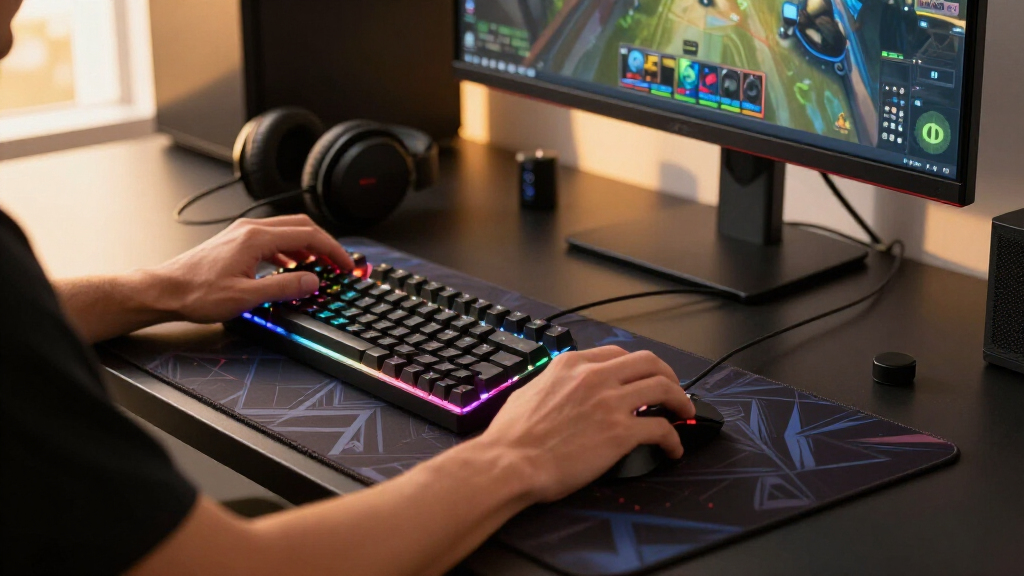

Creating an optimal gaming setup involves more than just a powerful PC or console — the right desk accessories can boost comfort, organization, and immersion. The VILONG Desk Clamp Power Strip stands out as the best overall for combining power and accessibility, while the HUANUO Dual Monitor Stand offers excellent ergonomic benefits for multi-screen setups. Lighting options like the Govee RGBIC Gaming Light Bars add ambiance and visual flair, but they can sometimes be distracting if overused. The main tradeoffs in this category revolve around balancing functionality, aesthetics, and ease of installation. Keep reading for a detailed breakdown of the best options to upgrade your gaming space.

Play games on Amazon Luna for your game nights, included with Prime
- A rotating selection of games, no download needed
- Play on TV, laptop or phone
- Fast, free delivery for your gear, too
Key Takeaways
- The top picks blend power management with usability, emphasizing cable management and accessibility.
- Lighting accessories vary widely; RGB options enhance ambiance but require careful placement to avoid distraction.
- Monitor stands with full adjustability improve ergonomics, especially for multi-monitor setups.
- Value varies significantly; some accessories offer premium features at higher prices, while others prioritize affordability.
- Ease of installation and compatibility are common considerations, with clamp-based designs preferred for flexibility.




More Details on Our Top Picks
VILONG Desk Clamp Power Strip USB C, 45W Fast Charging Station with 8 USB Ports & 5 AC Outlets
The VILONG Desk Clamp Power Strip stands out as the most versatile charging hub in this lineup, offering a combination of 8 USB ports—including 4 USB-C with 45W fast charging—and 5 AC outlets, all protected by surge protection. Compared to the Anker Nano Power Strip, it provides more USB ports and higher overall power capacity, making it ideal for users with multiple devices. Its clamp-on design efficiently saves desk space, but it requires wall clearance and is limited to desks up to 1.96 inches thick. The surge protection adds safety, while the clutter risk grows if many devices are connected simultaneously. Best for gamers or streamers needing multiple fast-charging ports and a clutter-free setup.
Pros:- Secure clamp-on design saves desk space
- Fast 45W USB-C charging supports quick device recharge
- Multiple USB and AC outlets for versatile device charging
- Built-in surge protection enhances safety
Cons:- Requires wall clearance of 0.4–0.5 inches, which may be tricky on tight setups
- Limited to desks up to 1.96 inches thick, restricting compatibility
Best for: Gamers or streamers who need to power multiple devices at once without sacrificing desk space.
Not ideal for: Users with very thick or custom desk edges beyond 1.96 inches or those seeking a wireless charging solution.
- USB-C Power:45W
- USB Ports:4 USB-C, 4 USB-A
- AC Outlets:5
- Surge Protection:1200J
- Material:Fire-resistant ABS
- Clamp Thickness:up to 1.96 inches
Our verdict“This power strip is ideal for users who want a reliable, space-saving charging station with high power capacity and safety features.”
HUANUO FlowLift™ Dual Monitor Stand for 13–32″ Screens, Fully Adjustable Desk Mount with C-Clamp & Grommet Base
The HUANUO FlowLift™ Dual Monitor Stand is the top choice for creating an ergonomic gaming or work station, offering full motion adjustments—tilt, swivel, and rotation—that surpass the static mounts. Unlike the Govee RGBIC Light Bars, this stand prioritizes visual comfort and workspace organization by raising monitors off the desk and reducing cable clutter. It supports dual monitors up to 32 inches and 19.8 pounds each, but its installation requires specific desk materials and thicknesses, making it less suitable for glass or plastic surfaces. Its maximum height adjustment of 15.75 inches ensures comfortable viewing angles, but compatibility is limited to desks within certain thickness ranges. This pick is perfect for gamers or streamers who want a tidy, adjustable dual-monitor setup.
Pros:- Fully adjustable for optimal ergonomic positioning
- Supports dual monitors with secure mounting options
- Helps reduce desk clutter and organize cables
- Supports a wide range of monitor sizes and weights
Cons:- Requires specific desk materials and thicknesses for installation
- Not suitable for glass or plastic desks, limiting versatility
Best for: Gamers or content creators with dual monitors seeking ergonomic positioning and workspace organization.
Not ideal for: Owners of glass desks or desks outside the specified thickness range who want a quick, tool-free setup.
- Monitor Size Range:13–32 inches
- Monitor Weight Range:4.4–19.8 lbs
- VESA Compatibility:75x75mm, 100x100mm
- Desk Thickness Range:0.59–3.54 inches
- Maximum Height Adjustment:15.75 inches
Our verdict“This monitor stand excels for those prioritizing ergonomic comfort and workspace tidiness with dual monitors.”
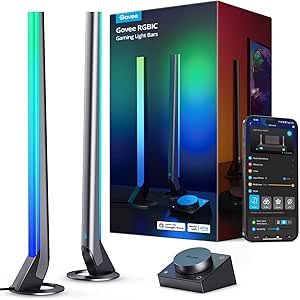
Govee RGBIC Gaming Light Bars H6047 with Smart Controller, Wi-Fi & Alexa/Google Compatible
The Govee RGBIC Gaming Light Bars add vibrant, customizable lighting that enhances gaming ambiance, supporting over 60 scene modes and 16.8 million color options. Compared to the RGB Gaming Mouse Pad, these lights focus on room or desk ambiance rather than peripheral illumination, making them ideal for creating immersive environments. Their Wi-Fi and voice control compatibility with Alexa and Google Assistant allow easy operation, but they do not support screen color picking or camera sync. Setup involves app configuration, which can be a minor hurdle for less tech-savvy users. These lights excel for gamers who want dynamic, scene-changing effects beyond static setups. This is the best choice for those seeking vivid, customizable lighting to elevate their gaming space.
Pros:- RGBIC technology with 16.8 million colors for vivid effects
- Supports voice commands via Alexa and Google Assistant
- Syncs with game audio and supports multiple scene modes
- Easy app control for customization
Cons:- No support for screen color picking, limiting integration with displays
- Requires app setup and stable Wi-Fi connection
Best for: Gamers who want immersive, customizable lighting that syncs with their gaming environment and voice commands.
Not ideal for: Users seeking screen-based or camera-based lighting effects, or those preferring plug-and-play solutions without app setup.
- Technology:RGBIC
- Connectivity:Wi-Fi, Bluetooth
- Scene Modes:60+
- Voice Control:Alexa, Google Assistant
- App Support:Govee Home App
- Sync with Razer Chroma:Yes
Our verdict“This lighting setup is perfect for gamers wanting vivid, customizable ambiance with smart home integration.”
Anker Nano Power Strip with Desk Clamp, 70W Max, Surge Protector, 6 AC Outlets, 2 USB-C, 2 USB-A, 5 ft Cord
The Anker Nano Power Strip offers a balanced mix of power and compact design, providing 6 AC outlets, 2 USB-C, and 2 USB-A ports with a maximum 70W output. Its dual-zone layout reduces clutter and supports fast charging for laptops and tablets, making it a practical upgrade over basic power strips like the Jgstkcity model. The built-in surge protection and 5-foot cord add safety and flexibility, but it’s limited by its compatibility with desk edges between 0.6 and 1.8 inches thick, which may exclude some users with curved or sloped desks. Its size and port arrangement make it excellent for users who want a clutter-free setup. This pick is ideal for space-conscious users who need reliable, high-speed charging without bulk.
Pros:- Multiple ports with dual-zone layout reduce clutter
- High-speed 70W USB-C charging supports laptops and tablets
- Secure desk clamp enhances stability
- Surge protection safeguards devices
Cons:- Limited compatibility with desk edges outside 0.6–1.8 inches
- No wireless charging or advanced smart features
Best for: Users with standard desk edges seeking a compact, reliable power strip for multiple devices.
Not ideal for: Owners of curved or very thick desks outside the specified edge thickness range, or those wanting wireless charging features.
- Number of AC outlets:6
- USB-C ports:2
- USB-A ports:2
- Power output:70W
- Surge protection:1500J
- Power cord length:5 ft
Our verdict“This power strip suits users needing a compact, high-capacity charging hub with a stable clamp and surge protection.”
RGB Gaming Mouse Pad Extra Large Extended 31.5×12 Inch – Black with LED Lighting
The RGB Gaming Mouse Pad provides an expansive 31.5 x 12 inch surface that comfortably fits keyboard, mouse, and peripherals, making it ideal for serious gaming setups. Its customizable RGB lighting with 14 modes (including static and dynamic options) adds visual flair, especially compared to standard mouse pads. The waterproof, micro-textured surface offers smooth tracking, while the anti-slip rubber base keeps it stable during intense moments. Although it requires a USB connection, which could add cable clutter, the large size and vibrant lighting make it a favorite for gamers who prioritize space and aesthetics. It’s less suitable for those seeking a more minimalistic setup or wireless lighting options. This mouse pad is perfect for gamers who want a large, illuminated surface that combines function and style.
Pros:- Large surface area supports multiple peripherals comfortably
- Customizable RGB lighting with multiple modes
- Waterproof surface prevents damage from spills
- Anti-slip rubber base ensures stability
Cons:- Requires USB connection, adding cable clutter
- Lighting modes may drain power if used extensively
Best for: Gamers who need a large, illuminated mouse pad to support extended movement and multiple peripherals.
Not ideal for: Users seeking wireless lighting or minimal desk clutter who prefer smaller or simpler mouse pads.
- Size:31.5 x 12 inches (800 x 300 mm)
- Lighting Modes:14 modes
- Material:Micro-textured cloth
- Base:Anti-slip rubber
- Waterproof:Yes
- Power Source:USB
Our verdict“This oversized illuminated mouse pad is best for gamers who want a spacious, vibrant surface with reliable stability.”
Govee Smart Light Bar, RGBICWW TV Lights for Living Room, Gaming, Black
This Govee RGBICWW smart light bar excels at creating dynamic, segmented lighting effects that significantly enhance gaming and entertainment setups. Compared with the Govee RGBIC Gaming Light Bars H6047, this model offers more versatile placement options, including behind monitors or TVs, thanks to its multiple mounting brackets. Its segmented RGBICWW technology allows for precise color control, producing vivid hues and warm whites that adapt to your content. The music sync feature adds an extra layer of immersion, especially during intense gaming sessions. However, its recommendation for monitors under 45 inches limits its use with larger screens, and full functionality depends on app or voice control, which can be complex for some users. Overall, this pick is ideal for gamers and streamers who want highly customizable ambient lighting that integrates seamlessly with smart home systems.
Pros:- Customizable segmented RGBICWW colors for precise lighting effects
- Music sync feature enhances gaming and media experiences
- Smart app control enables detailed customization and automation
- Versatile mounting options suit different space configurations
Cons:- Recommended only for monitors under 45 inches, limiting larger screens
- Setup and configuration via app or voice control can be complex
- Some users might find adjusting segmented colors less intuitive
Best for: Gamers and streamers seeking immersive, personalized lighting that can be integrated into a smart home ecosystem
Not ideal for: Users with larger monitors or TVs over 45 inches, or those preferring plug-and-play simplicity without app setup
- Color Technology:RGBICWW
- Length:106 inches
- Recommended Monitor Size:Under 45 inches
- Connectivity:App Control, Alexa, Google Home, Matter
- Included Mounting Options:Brackets for flat, vertical, or behind monitor/TV placement
Our verdict“This lighting bar is best suited for gamers and content creators who prioritize detailed customization and smart integration, accepting some setup complexity.”
Jgstkcity Desk Clamp Power Strip USB C, 40W Fast Charging Station, 4 PD 20W USB C Ports, 5 Outlets, 6FT Extension Cord, Edge Mount Surge Protector
This Jgstkcity power strip stands out for its secure clamp mounting and ample power options, making it an excellent choice for keeping your gaming or office desk tidy. Compared with the VILONG Desk Clamp Power Strip, which offers slightly higher power output at 45W, this model prioritizes safety features like overload protection and fireproof construction, giving peace of mind during heavy device use. Its four USB-C PD ports and two USB-A quick charge ports provide fast charging for multiple devices simultaneously, which is ideal for gaming setups with numerous peripherals. The 6-foot extension cord adds flexibility, and the clamp fits desks up to nearly 2 inches thick. The limited total power output of 40W may be insufficient for high-demand devices, and it lacks wireless charging, which could be a drawback for some users. Overall, this power strip suits gamers and students who need reliable, organized power access without sacrificing safety.
Pros:- Secure clamp mounting for stable placement on desk edges
- Multiple USB-C and USB-A ports for fast device charging
- Overload protection and fireproof materials enhance safety
- Includes a 6-foot extension cord for flexible placement
Cons:- Total power output of 40W may limit high-demand device charging
- Requires desk edge thickness up to 1.96 inches, which may not fit very thick desks
- No wireless charging capabilities available
Best for: Gamers, students, or professionals who need a secure, organized power solution with multiple charging options
Not ideal for: High-power devices or those seeking wireless charging, as the total power output is limited and no wireless feature is included
- Total Power Output:40W
- USB-C Ports:4 PD 20W each
- USB-A Ports:2 QC3.0, 3A Max each
- Outlets:5
- Extension Cord Length:6 feet
- Clamp Thickness:up to 1.96 inches
- Energy Rating:1200 Joules
- Material:Fireproof plastic
Our verdict“This power strip offers a reliable, organized charging station perfect for users who want safety and multiple ports without high wattage demands.”
How We Picked
Products were evaluated based on performance, build quality, ease of installation, versatility, and value. We prioritized accessories that genuinely enhance gaming comfort, organization, and aesthetics without adding unnecessary complexity. The ranking reflects a balance between feature set and user convenience, ensuring each pick serves a specific purpose—whether for maximizing power access, improving posture, or creating an immersive environment. We also considered customer feedback and overall durability to recommend accessories that stand the test of time in a gaming setup.Factors to Consider When Choosing Gaming Desk Accessories
Choosing the right gaming desk accessories involves weighing several factors that impact both your gaming experience and your workspace organization. High-quality accessories should complement your setup without creating clutter or distraction, while also offering durability and ease of use. Understanding what truly benefits your gaming habits can help you avoid unnecessary purchases and focus on items that add value.Power and Charging Capabilities
Power strips and charging stations should provide enough outlets and USB ports to support all your devices—controllers, headsets, chargers, and more. Look for models with surge protection to safeguard your equipment. A common mistake is choosing a power strip that’s too small or poorly rated, which can lead to frequent overloads or damage. Prioritize models with fast-charging USB-C ports if quick device recharge is important for your gaming routine.
Ergonomics and Adjustable Stands
Monitor stands that are adjustable help position screens at eye level, reducing neck strain during long gaming sessions. Clamping or grommet bases can free up desk space and offer flexibility in placement. Be cautious about stands that don’t support your monitor’s size or weight, as this can compromise stability. Investing in a sturdy, fully adjustable stand can prevent discomfort and improve your overall gaming posture.
Lighting and Ambiance
RGB lighting accessories can dramatically enhance your gaming atmosphere, making sessions more immersive. However, overly bright or color-changing lights placed in the wrong spots might become distracting or cause eye strain. Choose lighting that’s adjustable in brightness and color; placement should complement your setup without overwhelming your vision. Compatibility with voice assistants and smart home ecosystems can add convenience but may also introduce complexity.
Ease of Installation and Compatibility
Accessories that clamp or mount easily without requiring permanent modifications are ideal for most setups. Compatibility with your desk size and shape is crucial—measure your space carefully before purchasing. Overly complicated installations can discourage regular use or lead to damage. Prioritize versatile designs that can adapt as your setup evolves, and check product reviews for comments on installation ease.
Aesthetics and Personalization
The visual appeal of your desk accessories can influence your gaming environment. LED lighting, sleek power strips, and stylish monitor stands contribute to a cohesive look. Be mindful that some accessories might clash with your existing decor or feel out of place if overly flashy. Balancing form and function ensures your setup looks good while supporting your gaming needs.
Frequently Asked Questions
Will a power strip cause my gaming setup to overheat?
Most modern power strips and surge protectors are designed with overheating prevention features, but it’s important to avoid overloading them. Check the maximum wattage rating and ensure your total device power consumption stays within safe limits. Proper ventilation around your accessories also helps prevent heat build-up. Regularly inspecting your power strips for signs of wear can extend their lifespan and maintain safety.
Can RGB lighting cause distractions during intense gaming sessions?
RGB lighting can enhance immersion when used thoughtfully, but overly bright or dynamic effects might become distracting. To avoid this, choose lighting with adjustable brightness and modes that suit your preferences. Position lights so they don’t shine directly into your eyes or reflect off screens, which can cause eye strain. Using softer, indirect lighting often creates a better balance between ambiance and focus.
Are clamp-on monitor stands stable enough for large screens?
High-quality clamp-on stands are generally very stable, especially those rated for larger monitors. However, stability depends on proper installation and the clamp’s quality. Always verify the weight capacity and ensure the clamp tightly secures to your desk edge. For very large or heavy screens, choose stands with additional support or reinforced clamps to prevent wobbling or slipping during intense gaming.
How do I choose the right lighting for my gaming setup?
The best lighting balances visual enhancement with comfort. Look for RGB lights that are adjustable in color and brightness, and place them so they don’t cause glare or reflections on your screens. Consider smart lighting options that can sync with your games or music for dynamic effects. Ultimately, the goal is to create an immersive environment without overwhelming your senses or causing eye fatigue.
Should I prioritize aesthetics or functionality when choosing accessories?
While a visually appealing setup can boost your gaming experience, functionality should come first—especially if you spend long hours gaming. Effective accessories improve ergonomics, accessibility, and organization, which directly impact comfort and performance. Aim for a balance: select accessories that look good but also serve a practical purpose, ensuring your gaming space remains efficient and enjoyable over time.
Fall Picks
fall essentials
As an affiliate, we earn on qualifying purchases.