Competitive players choosing a gaming laptop face a practical tradeoff: spend less on an RTX 4060 system that can already drive high frame rates in many esports games, or pay substantially more for an RTX 4080 system with greater performance headroom. The GPU matters, but so do the display refresh rate, cooling, and the laptop’s power limits; a graphics chip alone does not guarantee a smoother match. For 1080p esports on a sensible budget, RTX 4060 laptops are usually the better fit. Choose RTX 4080 if you play demanding games, want higher resolutions, or need enough graphics capacity to support a high refresh rate more consistently.

Play games on Amazon Luna for your game nights, included with Prime
- A rotating selection of games, no download needed
- Play on TV, laptop or phone
- Fast, free delivery for your gear, too
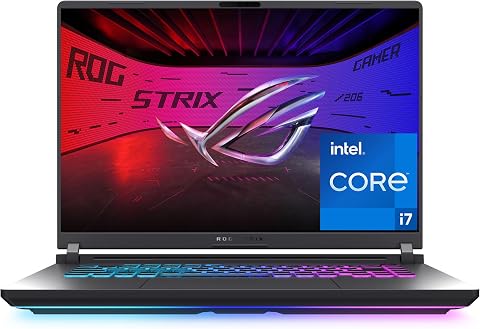
ASUS ROG Strix G16 (2025) Gaming Laptop
- ✔ Processor: Intel Core i7-14650HX
- ✔ Graphics: NVIDIA GeForce RTX 5060 Laptop GPU, 8GB
- ✔ Memory: 16GB DDR5-5600

MSI Cyborg 17 17.3-Inch FHD 144Hz Gaming Laptop
- ✔ Processor: Intel Core 7-240H
- ✔ Graphics: NVIDIA GeForce RTX 5060, 8GB GDDR7
- ✔ Memory: 16GB DDR5

Alienware 16 Aurora Gaming Laptop
- ✔ Processor: Intel Core 7 240H
- ✔ Graphics: NVIDIA GeForce RTX 5050 Laptop GPU
- ✔ Memory: 16GB DDR5-5600; listed maximum 32GB
At a Glance
| Criteria | RTX 4060 gaming laptops | RTX 4080 gaming laptops | Winner |
|---|---|---|---|
| Competitive-game frame rates | Strong 1080p performance in many esports titles; results vary by game and laptop power limit. | Higher performance headroom can help sustain higher frame rates, especially in demanding titles. | B |
| Demanding games and resolution | More likely to need reduced settings to sustain very high frame rates in demanding games. | Better suited to high settings, higher resolutions, and more GPU-intensive games. | B |
| Display and motion clarity | Often paired with 1080p or 1440p high-refresh displays; check the actual panel specifications. | More likely to appear in premium systems with high-resolution, high-refresh panels; verify each model. | Depends |
| Cooling and sustained performance | Lower total heat in many configurations, though chassis and cooling design still matter. | Greater performance can mean more heat and fan noise under load; cooling quality is key. | Depends |
| Portability and battery use | Often available in more affordable, lighter configurations; gaming still uses substantial power. | Commonly fitted to larger, heavier premium laptops; gaming battery life remains limited. | A |
| Price and value | Usually the better value for 1080p competitive play. | Costs much more; the premium pays off when its extra graphics performance is useful. | A |
ASUS ROG Strix G16 (2025) Gaming Laptop
The ASUS ROG Strix G16 earns the lead by pairing the lineup’s highest listed refresh rate, 165Hz, with an RTX 5060 Laptop GPU and an Intel Core i7-14650HX. For games where quick camera turns and clear motion matter, that panel gives it a stronger competitive focus than the Alienware’s 120Hz screen. It also edges the MSI’s 144Hz display on refresh rate, though both ASUS and MSI list RTX 5060 graphics, so the supplied specifications do not establish which will deliver higher frame rates in a particular game.Cooling is another reason to choose it for sustained play: ASUS lists a vapor chamber, three fans, and liquid metal. Tool-free access to memory and storage is a useful practical advantage if the 16GB configuration eventually feels limiting. There are caveats. The listing calls the screen FHD+ but also gives 1920 × 1200, so we would verify the panel description before buying. Its stated two-hour battery life also makes it a poor choice for unplugged sessions. At 2.65 kg, it is heavier than a compact everyday laptop, and the ASUS product details supplied here do not list Ethernet.
Pros:
- 165Hz display is the highest listed refresh rate in this comparison.
- RTX 5060 graphics and Intel Core i7-14650HX processor.
- Vapor-chamber, tri-fan cooling design with liquid metal.
- Tool-free access to RAM and SSD for upgrades.
Cons:
- Battery life is listed as two hours.
- Display naming and resolution details are inconsistent in the supplied product information.
- At 2.65 kg, it is not a lightweight travel pick; Ethernet is not listed in the supplied specs.
Best for: Players who want the highest listed refresh rate, RTX 5060 graphics, and a cooling design aimed at sustained gaming sessions.
Not ideal for: Buyers who prioritize long unplugged use, a clearly documented display specification, or a lightweight laptop for frequent travel.
Bottom line: We rank the ASUS first for its 165Hz panel, RTX 5060, and performance-oriented cooling, provided buyers verify the display details and plan to play near an outlet.
“We rank the ASUS first for its 165Hz panel, RTX 5060, and performance-oriented cooling, provided buyers verify the display details and plan to play near an outlet.”
MSI Cyborg 17 17.3-Inch FHD 144Hz Gaming Laptop
The MSI Cyborg 17 makes the most sense for players who want a large screen without stepping down from RTX 5060 graphics. Its 17.3-inch, 144Hz Full HD panel offers more physical viewing area than either 16-inch rival, which can make interface elements and opponents easier to pick out from a desk setup. The ASUS still has the higher listed refresh rate at 165Hz, so players who rank motion updates above screen size should favor that model instead.MSI pairs its display with an Intel Core 7-240H, 16GB of DDR5, a 1TB NVMe SSD, and a Cooler Boost thermal design. A wired Ethernet port, HDMI, and USB-C make it straightforward to connect to a stable network and external display. That connectivity gives it a clear setup advantage over the ASUS based on the supplied port lists. The compromises are mainly about mobility and documentation: its 17.3-inch chassis is the largest here, and the listed thickness is inconsistent. Wi-Fi 6E is also one generation behind the Wi-Fi 7 listed for ASUS and Alienware. Choose it for a roomy gaming station; skip it if you want the fastest panel or a smaller travel companion.
Pros:
- 17.3-inch matte Full HD display with a 144Hz refresh rate.
- RTX 5060 graphics with 8GB GDDR7 memory.
- 1TB NVMe SSD and 16GB DDR5 memory.
- Ethernet, HDMI, USB-C, and USB-A are listed.
Cons:
- Its 17.3-inch size makes it less convenient to carry than the 16-inch options.
- The product details conflict on chassis thickness.
- Wi-Fi 6E is listed, while ASUS and Alienware specify Wi-Fi 7.
Best for: Players who prefer a 17.3-inch view, RTX 5060 graphics, and built-in Ethernet for a desk-based competitive setup.
Not ideal for: Frequent travelers or buyers who want the lineup’s highest refresh rate, the sharpest resolution, or the newest listed Wi-Fi generation.
Bottom line: We recommend the MSI for a larger, Ethernet-ready gaming station, while the ASUS remains the better match for buyers who value the highest listed refresh rate.
“We recommend the MSI for a larger, Ethernet-ready gaming station, while the ASUS remains the better match for buyers who value the highest listed refresh rate.”
Alienware 16 Aurora Gaming Laptop
The Alienware 16 Aurora takes a different route from the two RTX 5060 models: its 16-inch WQXGA panel gives it the highest listed resolution, 2560 × 1600, but its refresh rate is 120Hz and its graphics are RTX 5050. That combination favors sharper-looking detail over the faster motion focus of the ASUS at 165Hz or the MSI at 144Hz. Competitive players who primarily want smooth, responsive-looking motion should consider those two first; players who also value a higher-resolution screen may find Alienware’s balance more attractive.The 300-nit anti-glare panel, Wi-Fi 7, Ethernet, and Cryo-Chamber cooling design give it a practical mix for home play and wired networking. It also includes 16GB of DDR5 memory, with support listed up to 32GB, though buyers should confirm the upgrade path and configuration. Its Intel Core 7 240H is a different processor listing from ASUS’s Core i7-14650HX, and the supplied information does not provide a basis for a direct performance guarantee. At 5.5 pounds, it is substantial to carry. The 120Hz ceiling and RTX 5050 make it the least specialized option here for chasing maximum competitive smoothness, but it stands out if resolution and a broad port selection matter more.
Pros:
- 16-inch WQXGA display at 2560 × 1600 with anti-glare finish.
- Wi-Fi 7 and Ethernet are listed.
- Cryo-Chamber airflow design directs air to core components.
- Memory configuration supports up to 32GB according to the supplied specs.
Cons:
- 120Hz is the lowest listed refresh rate in this lineup.
- RTX 5050 is a lower graphics tier than the RTX 5060 options listed for ASUS and MSI.
- At 5.5 pounds, it is heavy for frequent travel.
Best for: Players who want a sharper 16-inch display for mixed gaming and general use, plus Wi-Fi 7 and Ethernet.
Not ideal for: Competitive players who prioritize the highest refresh rate or specifically want RTX 5060 graphics.
Bottom line: We choose the Alienware when sharper resolution and wired connectivity matter more than matching the ASUS’s 165Hz or the MSI’s RTX 5060 graphics.
“We choose the Alienware when sharper resolution and wired connectivity matter more than matching the ASUS’s 165Hz or the MSI’s RTX 5060 graphics.”
As an Amazon Associate we earn from qualifying purchases.
Key Differences
The main difference is performance headroom. An RTX 4060 laptop is often enough for 1080p competitive play, where lower graphics settings and a fast display can matter more than premium visual effects. An RTX 4080 laptop gives demanding games more room to maintain high frame rates, particularly at higher resolutions or settings. Actual results depend on the laptop’s GPU power limit, cooling, processor, and game, so compare complete models rather than assuming every laptop with the same GPU performs alike.
The value question follows from that gap. If the games you play already run at frame rates that suit your display on an RTX 4060, the RTX 4080’s higher price may buy numbers you rarely notice during matches. If your games are demanding, you want a high-resolution screen, or you also play graphically intensive single-player titles, the premium can translate into smoother performance and fewer compromises. Neither GPU makes a poor display, uncomfortable keyboard, or weak cooling disappear.
Detailed Comparison
Competitive-game frame rates (RTX 4080 gaming laptops wins — major)
RTX 4080 wins by a moderate to major margin in GPU-limited games, but the visible benefit depends on the title, settings, and display. Many esports games run quickly on an RTX 4060 laptop at 1080p, especially with competitive settings. The RTX 4080 is more useful when you want to keep frame rates high in demanding games or pair them with a very fast display. Check benchmarks for the exact laptop configuration and games you play.
Demanding games and resolution (RTX 4080 gaming laptops wins — major)
RTX 4080 wins by a major margin for high settings and higher resolutions. Its additional graphics capacity gives demanding games more room before you need to lower visual quality or accept reduced frame rates. At 1080p with esports settings, that extra capacity may make little practical difference. Choose around your actual games and resolution instead of paying for performance you will not use.
Display and motion clarity (moderate difference)
This is a model-by-model decision, so the winner is a tie overall. A laptop’s refresh rate, response behavior, brightness, and resolution shape what you see; the GPU does not determine panel quality. RTX 4080 laptops may be sold with premium high-resolution, high-refresh panels, while RTX 4060 models can also offer fast displays. Compare panel specifications and independent response-time measurements, not just the GPU tier.
Cooling and sustained performance (moderate difference)
There is no automatic winner: the result depends on the chassis and power tuning. An RTX 4080 can deliver more performance, but it also puts greater demands on cooling and can run louder under heavy load. An RTX 4060 system may be easier to cool, yet a thin or poorly tuned model can still throttle or become noisy. Look for sustained gaming benchmarks and noise measurements for the exact model.
Portability and battery use (RTX 4060 gaming laptops wins — moderate)
RTX 4060 wins by a minor to moderate margin among comparable laptops because it is more often found in less expensive, less bulky designs. That is not a guarantee: both GPU tiers appear in a wide range of chassis, and gaming laptops usually need wall power for demanding play. Compare weight, charger size, and battery tests for everyday tasks. For tournament travel, the full system matters more than the GPU label.
Price and value (RTX 4060 gaming laptops wins — major)
RTX 4060 wins for most players focused on competitive 1080p gaming. It usually costs substantially less while meeting the frame-rate needs of many esports players. The RTX 4080 premium is justified when its extra performance changes your experience: demanding games at high settings, higher-resolution play, or less frequent need to lower graphics options. Compare current prices and full specifications, since discounts can narrow the gap.
RTX 4060 gaming laptops: Pros and Cons
Pros:
- Lower purchase price leaves room in the budget for a good mouse, headset, or external monitor.
- Capable of high frame rates in many esports games at 1080p.
- More likely to come in portable or midrange configurations.
Cons:
- Less headroom for demanding games, higher settings, and higher resolutions.
- Performance varies with laptop power limits and cooling; the GPU name alone is not enough.
- Some models cut corners on display response, memory, or build quality to hit a price.
RTX 4080 gaming laptops: Pros and Cons
Pros:
- More graphics performance for demanding games and higher resolutions.
- Greater headroom for sustaining high frame rates at demanding settings.
- A better fit for players who also want a premium gaming experience outside esports.
Cons:
- Much higher cost, with diminishing returns for players already satisfied at 1080p.
- Powerful configurations can be heavier, louder, and more demanding to cool.
- A premium GPU cannot compensate for a slow or poor-quality display.
Who Should Choose What
Choose RTX 4060 gaming laptops if:
- You mainly play esports games at 1080p and prefer competitive graphics settings.
- Your budget is limited and you would rather invest in a quality display, peripherals, or travel setup.
- You want a gaming laptop that is easier to carry and can accept some compromises in demanding games.
Choose RTX 4080 gaming laptops if:
- You play GPU-intensive games and want high frame rates without lowering settings as much.
- You plan to play at 1440p or another higher resolution, or want a premium panel paired with enough graphics power.
- You can afford the premium and will use the added performance across several demanding games.
Skip both if: You need strong battery life for long gaming sessions away from an outlet, or your priority is the highest possible competitive frame rate per dollar; compare gaming desktops or lighter non-gaming laptops paired with a desktop setup.
Value for Money
For most competitive players, the RTX 4060 is the better value because popular esports titles at 1080p often do not need an RTX 4080 to feel responsive. Put part of the savings toward a laptop with a genuinely fast display, reliable cooling, and a keyboard you like; those features affect every match. Pay more for RTX 4080 when you play demanding games, target higher resolutions, or have benchmarks showing that an RTX 4060 configuration falls short of your frame-rate goal. Compare current system prices, since the premium varies by model and sale.
Final Verdict
Choose an RTX 4060 laptop for competitive 1080p play unless your games or resolution call for more graphics power. It is the clear value choice for players who use lower settings and want high frame rates without paying for excess capacity. Choose RTX 4080 if you also play demanding titles, want higher resolutions or settings, and can use its extra performance. The deciding factor is whether the games you actually play push the RTX 4060 below your target frame rate. Before buying either, verify the exact laptop’s display, cooling, GPU power limit, and game-specific benchmarks.
Frequently Asked Questions
Is an RTX 4060 laptop enough for competitive gaming?
For many esports games at 1080p, yes. Performance varies by title and laptop configuration, so compare benchmarks for the specific model and check that its display refresh rate suits your target frame rate.
Is an RTX 4080 laptop worth the extra cost for esports?
Usually only if you also play demanding games, want higher resolutions, or have measured a shortfall on an RTX 4060 system. For esports at 1080p and competitive settings, many players will get more value from a strong display and well-cooled RTX 4060 laptop.
Will a 240 Hz screen make an RTX 4060 laptop faster?
No. The screen can display more frequent updates, but the GPU and game determine how many frames the system renders. A high refresh rate is most useful when the laptop can produce frame rates that take advantage of it.
Should I prioritize the GPU or the display for competitive play?
Match both to your games and target frame rate. A fast, responsive display matters only if the system can deliver enough frames, while a powerful GPU cannot fix a slow panel. Check the screen’s refresh rate and response behavior alongside game-specific performance benchmarks.