
For most competitive players, I’d start with the Razer Viper V3 Pro: its lightweight wireless design is built for fast, controlled movement. The Razer DeathAdder V3 Pro is a strong alternative for players who prefer an ergonomic shape, while the Logitech G305 LIGHTSPEED offers a simpler wireless option for buyers who want fewer extras. The main tradeoffs are shape and grip comfort, weight and battery approach, and whether extra buttons help or distract during play. This roundup compares 15 competitive gaming mice across those priorities, from esports-focused models to versatile wired and multi-button options. Read on for the full breakdown and guidance on choosing the right mouse for your hand, grip, and games.

Play games on Amazon Luna for your game nights, included with Prime
- A rotating selection of games, no download needed
- Play on TV, laptop or phone
- Fast, free delivery for your gear, too
Complete the kit



Key Takeaways
- Lightweight, focused designs lead this roundup: the Razer Viper V3 Pro and Viper V4 Pro are the clearest fits for players prioritizing quick movement and a streamlined control layout.
- Shape can matter more than headline specs: the DeathAdder V3 Pro suits players who want an ergonomic form, while the Viper family favors a symmetrical shape.
- Wireless does not have to mean premium esports hardware: the G305 LIGHTSPEED and Viper V3 HyperSpeed offer simpler routes to cordless play, with different compromises in design and features.
- Extra controls favor versatility over a focused competitive setup: the Redragon M908, G502 HERO, and Basilisk models make more sense for MMO, macro, or mixed-use play than for a minimal esports layout.
- The lineup spans very different budgets and needs: compare the sensor and connectivity claims with shape, weight, button layout, and your actual game before paying for features you may not use.
| Razer Viper V4 Pro Wireless Esports Gaming Mouse, 49 g, Black |  | Best Overall for Competitive Play | Weight: 49 g | Sensor: Focus Pro 50K Optical Sensor Gen-3 | Maximum sensitivity: 50,000 DPI | VIEW LATEST PRICE | See Our Full Breakdown |
| Logitech G305 LIGHTSPEED Wireless Gaming Mouse with HERO 12K Sensor, Black |  | Best Value Wireless Pick | Weight: 99 g (3.4 oz) | Sensor: HERO optical | Sensitivity: 200–12,000 DPI | VIEW LATEST PRICE | See Our Full Breakdown |
| Logitech G703 LIGHTSPEED Wireless Gaming Mouse with HERO 25K Sensor |  | Best for a Fuller, Gripped Shape | Weight: 95 g | Sensor: HERO 25K optical | Maximum sensitivity: 25,600 DPI | VIEW LATEST PRICE | See Our Full Breakdown |
| Redragon M908 Wired MMO RGB Gaming Mouse, 12,400 DPI |  | Best for Button-Heavy MMO Play | Weight: 175 g | Sensor: Optical Pixart PAW3327 | Maximum sensitivity: 12,400 DPI | VIEW LATEST PRICE | See Our Full Breakdown |
| Razer Viper V3 HyperSpeed Wireless Gaming Mouse |  | Best for Long Battery Life | Weight: 82 g | Sensor: Focus Pro 30K optical | Maximum sensitivity: 30,000 DPI | VIEW LATEST PRICE | See Our Full Breakdown |
| Razer DeathAdder Essential Ergonomic Wired Gaming Mouse | 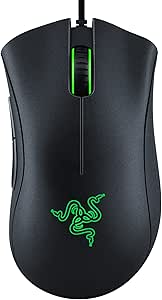 | Best for a Familiar Ergonomic Grip | Connectivity: Wired | Sensor: Optical | Maximum sensitivity: 6,400 DPI | VIEW LATEST PRICE | See Our Full Breakdown |
| Razer Basilisk V3 X HyperSpeed Customizable Wireless Gaming Mouse |  | Best for Wireless Customization | Connectivity: HyperSpeed Wireless, Bluetooth | Sensor: Razer 5G Advanced Optical Sensor | Maximum DPI: 18,000 | VIEW LATEST PRICE | See Our Full Breakdown |
| NSYCA G11 Tri-Mode Wireless Gaming Mouse with 3 Side Buttons, Adjustable 22,000 DPI, RGB Lighting, and USB-C Charging |  | Best for Connection Flexibility | Sensor: PAW3311 optical | Maximum sensitivity: 22,000 DPI | Connectivity: Bluetooth 5.1, 2.4 GHz wireless, USB-C wired | VIEW LATEST PRICE | See Our Full Breakdown |
| Logitech G PRO X3 SUPERSTRIKE Wireless Gaming Mouse, Black |  | Best for Adjustable Click Response | Connectivity: LIGHTSPEED wireless | Sensor: HERO 2 optical | Maximum sensitivity: Product information lists 48,000 DPI and 40,000 DPI | VIEW LATEST PRICE | See Our Full Breakdown |
| Logitech G PRO X2 SUPERSTRIKE Wireless Gaming Mouse – Black/White |  | Best Lightweight Click-Tuning Pick | Connectivity: LIGHTSPEED wireless, USB | Sensor: HERO 2 | Maximum sensitivity: Product information lists up to 44,000 DPI and 26,000 DPI | VIEW LATEST PRICE | See Our Full Breakdown |
| Razer DeathAdder V3 Pro Wireless Gaming Mouse, 63 g, Black | 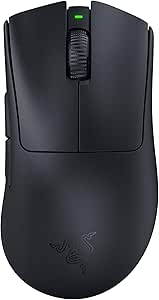 | Best Ergonomic Wireless Pick | Weight: 63 g | Sensor: Focus Pro 30K optical | Maximum sensitivity: 30,000 DPI | VIEW LATEST PRICE | See Our Full Breakdown |
| Razer Viper V3 Pro Wireless Esports Gaming Mouse, 54 g, Black |  | Best for High-Polling Wireless Play | Weight: 54 g | Sensor: Focus Pro 35K Gen-2 optical | Maximum sensitivity: 35,000 DPI | VIEW LATEST PRICE | See Our Full Breakdown |
| ATK Dragonfly A9 Air Wireless Gaming Mouse, Sunset Orange |  | Best Lightweight Battery-Life Pick | Weight: 47 g ± 3 g | Dimensions: 125 × 63.5 × 40 mm | Sensor: PAW3950 Ultra optical | VIEW LATEST PRICE | See Our Full Breakdown |
| Logitech G502 HERO Wired Gaming Mouse |  | Best for Programmable Controls | Connectivity: Wired | Sensor: Optical HERO | Maximum sensitivity: 25,600 DPI | VIEW LATEST PRICE | See Our Full Breakdown |
| Razer Basilisk V3 Wired Ergonomic Gaming Mouse with Customizable RGB |  | Best Ergonomic Wired Control Pick | Connectivity: USB wired | Design: Ergonomic with thumb rest | Sensor: Focus+ optical | VIEW LATEST PRICE | See Our Full Breakdown |
| competitive gaming mice | Sensor | Maximum sensitivity | Weight | Buttons |
|---|---|---|---|---|
| Razer Viper V4 Pro Wireless Es | Focus Pro 50K Optical Sensor Gen-3 | 50,000 DPI | 49 g | — |
| Logitech G305 LIGHTSPEED Wirel | HERO optical | — | 99 g (3.4 oz) | 6 programmable |
| Logitech G703 LIGHTSPEED Wirel | HERO 25K optical | 25,600 DPI | 95 g | 6 programmable |
| Redragon M908 Wired MMO RGB Ga | Optical Pixart PAW3327 | 12,400 DPI | 175 g | — |
| Razer Viper V3 HyperSpeed Wire | Focus Pro 30K optical | 30,000 DPI | 82 g | 6 |
| Razer DeathAdder Essential Erg | Optical | 6,400 DPI | 0.13 kg | 5 programmable |
| Razer Basilisk V3 X HyperSpeed | Razer 5G Advanced Optical Sensor | — | — | — |
| NSYCA G11 Tri-Mode Wireless Ga | PAW3311 optical | 22,000 DPI | 67 g | 7 total; 6 programmable |
| Logitech G PRO X3 SUPERSTRIKE | HERO 2 optical | Product information lists 48,000 DPI and 40,000 DPI | — | — |
| Logitech G PRO X2 SUPERSTRIKE | HERO 2 | Product information lists up to 44,000 DPI and 26,000 DPI | 61 g | 5 |
| Razer DeathAdder V3 Pro Wirele | Focus Pro 30K optical | 30,000 DPI | 63 g | 5 programmable |
| Razer Viper V3 Pro Wireless Es | Focus Pro 35K Gen-2 optical | 35,000 DPI | 54 g | 6 programmable |
| ATK Dragonfly A9 Air Wireless | PAW3950 Ultra optical | 30,000 DPI in specs; description lists 42,000 DPI | 47 g ± 3 g | 6 programmable |
| Logitech G502 HERO Wired Gamin | Optical HERO | 25,600 DPI | — | 11 programmable |
| Razer Basilisk V3 Wired Ergono | Focus+ optical | 26,000 DPI | — | 11 programmable |
More Details on Our Top Picks
Razer Viper V4 Pro Wireless Esports Gaming Mouse, 49 g, Black
The Razer Viper V4 Pro is the strongest fit here for players who prioritize quick, controlled movement and low-latency wireless response. At 49 g, it is far lighter than the Logitech G703 and Redragon M908, which can make repeated flicks and direction changes feel less physically demanding. Its 8,000 Hz polling option targets players seeking frequent input updates, while the optical switches and scroll wheel are designed for consistent actuation. The tradeoff is battery endurance: the stated maximum falls from 180 hours at 1,000 Hz to 45 hours at 8,000 Hz. It also costs you setup time if you want advanced tuning, since those settings run through Synapse 4. I’d choose it over the Viper V3 HyperSpeed for a lighter, higher-polling esports-focused build, not for battery simplicity.
Pros:- 49 g symmetrical body supports fast repositioning with less mass to move.
- Up to 8,000 Hz polling provides a high-frequency input option for competitive setups.
- Gen-4 optical switches and an optical scroll wheel are designed for consistent input.
- Long stated battery life at 1,000 Hz, with grip tape and a wireless dongle included.
Cons:- Battery life is listed at up to 45 hours when polling at 8,000 Hz.
- Advanced performance customization requires Synapse 4.
- Its competitive-focused feature set may be unnecessary for casual play.
Best for: Competitive FPS players who want a very light symmetrical wireless mouse, high polling options, and software-tunable performance.
Not ideal for: Players who want to avoid configuration software or prioritize long battery life while using the highest polling rate.
- Weight:49 g
- Sensor:Focus Pro 50K Optical Sensor Gen-3
- Maximum sensitivity:50,000 DPI
- Maximum tracking speed:930 IPS
- Maximum polling rate:8,000 Hz
- Battery life:Up to 180 hours at 1,000 Hz; up to 45 hours at 8,000 Hz
- Switches:Razer Optical Mouse Switches Gen-4; over 100 million clicks
- Compatibility:PC and Mac
Our verdict“Choose the Viper V4 Pro if lightweight, high-polling wireless performance matters more to you than maximum-rate battery life or software-free setup.”
Logitech G305 LIGHTSPEED Wireless Gaming Mouse with HERO 12K Sensor, Black
The Logitech G305 is the practical wireless choice for players who want a straightforward competitive setup without chasing ultralight weight or extreme sensor numbers. Its 1 ms LIGHTSPEED report rate gives it a responsive wireless connection, and the HERO sensor’s 12,000 DPI range is ample for tuning sensitivity to a player’s preferred aim style. Compared with the 49 g Razer Viper V4 Pro, the G305 is substantially heavier at 99 g, so it is less suited to rapid, low-effort swipes. Its strengths instead are simplicity and endurance: one AA battery is listed for up to 250 hours, and the receiver stores inside the mouse for transport. The battery requirement and USB receiver are less convenient than rechargeable designs, but they keep the setup uncomplicated.
Pros:- LIGHTSPEED wireless connection has a 1 ms report rate.
- HERO sensor offers adjustable sensitivity from 200 to 12,000 DPI.
- Up to 250 hours of stated battery life from one AA battery.
- Built-in receiver storage makes it easier to carry than a mouse with a separate loose dongle.
Cons:- At 99 g, it is much heavier than the Razer Viper V4 Pro.
- Requires an AA battery rather than built-in rechargeable power.
- Wireless operation depends on a USB receiver.
Best for: Players building a compact wireless PC setup who want responsive connectivity, long battery life, and six programmable buttons.
Not ideal for: Low-sensitivity FPS players seeking an ultralight mouse or anyone who prefers rechargeable operation without disposable batteries.
- Weight:99 g (3.4 oz)
- Sensor:HERO optical
- Sensitivity:200–12,000 DPI
- Report rate:1 ms
- Buttons:6 programmable
- Battery:1 included AA battery
- Battery life:Up to 250 hours
- Receiver storage:Built-in
Our verdict“Pick the G305 if you want dependable, long-running wireless performance and can accept extra weight and AA-battery power.”
Logitech G703 LIGHTSPEED Wireless Gaming Mouse with HERO 25K Sensor
Among these picks, the Logitech G703 makes the most sense for players who prefer a fuller shape and added grip over the minimum possible weight. Its rubber side grips offer purchase during quick repositioning, while the HERO 25K sensor and LIGHTSPEED wireless connection cover the core needs of competitive play. The tradeoff is clear beside the Razer Viper V4 Pro: at 95 g, the G703 asks for more effort during repeated flicks, and its listed battery life is up to 35 hours with default lighting. Six programmable buttons and an optional 10 g weight let players tailor the setup, though adding weight works against fast, low-mass movement. POWERPLAY charging can reduce charging interruptions, but that system is sold separately.
Pros:- HERO 25K sensor supports 1:1 tracking and up to 25,600 DPI.
- LIGHTSPEED wireless connectivity provides cable-free play.
- Rubber side grips support a more secure hold during rapid movements.
- Six programmable buttons and optional weight allow some setup customization.
Cons:- At 95 g, it is considerably heavier than the Viper V4 Pro.
- Battery life is listed at up to 35 hours with default lighting.
- POWERPLAY wireless charging requires a separate purchase.
Best for: Players who want a wireless competitive mouse with rubber side grips, a fuller feel, and programmable controls.
Not ideal for: Players who favor ultralight FPS mice or want long battery life without relying on separately sold charging accessories.
- Weight:95 g
- Sensor:HERO 25K optical
- Maximum sensitivity:25,600 DPI
- Tracking speed:400+ IPS
- Buttons:6 programmable
- Battery life:Up to 35 hours with default lighting
- Optional weight:10 g
- Charging compatibility:POWERPLAY wireless charging system, sold separately
Our verdict“Choose the G703 if grip and a fuller wireless shape matter more to you than ultralight movement or long intervals between charges.”
Redragon M908 Wired MMO RGB Gaming Mouse, 12,400 DPI
The Redragon M908 serves a different competitive need from the lighter, simpler mice in this group: it puts 18 programmable buttons within reach for MMO skills, macros, and other control-heavy play. Five onboard profiles can keep different layouts available, while the wired USB connection avoids battery management. That flexibility comes with a substantial movement tradeoff. At 175 g, the M908 is far heavier than the G305 or Viper V4 Pro, making it a poor match for players who rely on frequent fast swipes in competitive shooters. Its right-handed shape and adjustable weights also favor a deliberate, customized setup over a minimal one. I’d pick it over the G703 when side-button capacity matters most, but not as an all-purpose lightweight esports mouse.
Pros:- 18 programmable buttons support many in-game actions without relying only on keyboard inputs.
- Five onboard memory profiles store different control setups.
- DPI can be adjusted from 200 to 12,400 in 100-DPI increments through software.
- Wired USB operation removes the need to manage a battery.
Cons:- At 175 g, it is much heavier than the wireless options suited to fast swiping.
- The design is right-handed only.
- Programmable features are supported on Windows; Mac is listed for normal use only.
Best for: Right-handed MMO and strategy players who need many programmable controls and onboard profiles for distinct game layouts.
Not ideal for: FPS players seeking a lightweight mouse, left-handed users, or Mac players who need programmable features.
- Weight:175 g
- Sensor:Optical Pixart PAW3327
- Maximum sensitivity:12,400 DPI
- Polling rate:1,000 Hz
- Programmable buttons:18
- Memory profiles:5
- Weight adjustment:Eight 2.4 g weights
- Connectivity:USB wired; 6 ft braided cable
Our verdict“Choose the M908 for button-dense MMO controls and profile storage, but skip it if competitive play depends on a light, fast-moving mouse.”
Razer Viper V3 HyperSpeed Wireless Gaming Mouse
The Razer Viper V3 HyperSpeed is a balanced wireless pick for players who want an esports-oriented shape without the Viper V4 Pro’s emphasis on minimum weight and very high polling. Its 82 g body is lighter than the Logitech G305 and G703, though it remains well above the V4 Pro’s 49 g. The Focus Pro 30K sensor, six buttons, and on-mouse DPI control give players useful adjustment without requiring every change to start in software. Battery life is its clearest advantage: the included AA battery is listed for up to 280 hours. The cost of that convenience is reliance on replaceable battery power, and the supplied data does not list a polling rate. This is a sensible middle ground, not the pick for players chasing the lightest possible setup.
Pros:- 82 g body is lighter than the Logitech G305 and G703.
- Focus Pro 30K optical sensor supports sensitivity up to 30,000 DPI.
- Up to 280 hours of stated battery life from one included AA battery.
- On-mouse DPI control allows sensitivity changes without relying solely on software.
Cons:- Requires an AA battery rather than built-in rechargeable power.
- Heavier than the 49 g Viper V4 Pro for fast, low-effort swipes.
- The listed product data does not specify a polling rate.
Best for: Claw- or fingertip-grip players who want an ambidextrous wireless mouse with long stated battery life and easy on-mouse DPI adjustment.
Not ideal for: Players who want a rechargeable mouse, the lightest possible body, or a specified high-polling option for competitive play.
- Weight:82 g
- Sensor:Focus Pro 30K optical
- Maximum sensitivity:30,000 DPI
- Buttons:6
- Battery:1 included AA battery
- Battery life:Up to 280 hours
- Dimensions:5 × 2.51 in
- Switch lifespan:60 million clicks
Our verdict“Choose the Viper V3 HyperSpeed if long battery life and wireless flexibility matter more than rechargeable power or ultralight weight.”
Razer DeathAdder Essential Ergonomic Wired Gaming Mouse
The DeathAdder Essential suits players who value a supportive right-handed shape and straightforward wired control over wireless flexibility. Its 6,400 DPI optical sensor and five programmable buttons cover common competitive setups, while the ridged rubber scroll wheel offers a secure grip for quick weapon or menu changes. Compared with the Razer Basilisk V3 X HyperSpeed, it has fewer controls and no wireless mode, but it avoids battery management and keeps the setup simple. The tradeoff is a more basic feature set than the lighter, wireless-focused options in this roundup, and its right-handed contour will not suit every grip or hand. I’d choose it for comfortable, uncomplicated play rather than advanced customization or cable-free movement.
Pros:- Ergonomic right-handed shape is designed for extended sessions.
- Adjustable optical sensitivity reaches 6,400 DPI.
- Five programmable buttons support remapping and macros.
- Rubberized scroll wheel and switches rated for up to 10 million clicks.
Cons:- Wired connection restricts movement compared with wireless picks such as the Basilisk V3 X HyperSpeed.
- Right-handed shape excludes left-handed users.
- Its 6,400 DPI ceiling and basic feature set are less suited to players seeking high-end competitive customization.
Best for: Right-handed players who want an ergonomic shape, programmable basics, and a wired mouse that never needs charging.
Not ideal for: Left-handed players or competitive gamers who want wireless freedom, a lightweight design, or more advanced sensor and control features.
- Connectivity:Wired
- Sensor:Optical
- Maximum sensitivity:6,400 DPI
- Buttons:5 programmable
- Switch durability:Up to 10 million clicks
- Hand orientation:Right-handed
- Weight:0.13 kg
- Cable length:5.0 m
Our verdict“Choose the DeathAdder Essential for comfortable, no-battery wired play if its right-handed shape and modest feature set fit your needs.”
Razer Basilisk V3 X HyperSpeed Customizable Wireless Gaming Mouse
The Basilisk V3 X HyperSpeed is the flexible control pick for right-handed players who want extra inputs without a cable. Its nine customizable controls suit games that benefit from mapped actions, while onboard profile storage makes it easier to carry settings between compatible setups. HyperSpeed Wireless targets responsive play; Bluetooth and long stated battery life offer a lower-power option for everyday use. Compared with the wired DeathAdder Essential, this model gives you more controls and connection choices, but it depends on an AA battery and has a more feature-heavy setup. Its 18,000 DPI sensor is ample for a broad range of play, though a high DPI ceiling alone does not make it a better competitive choice than lighter, simpler esports-focused mice. I’d favor it for adaptable controls over the lowest weight.
Pros:- HyperSpeed Wireless and Bluetooth offer two wireless connection options.
- Nine customizable controls support varied game bindings.
- Onboard profile storage keeps configured settings available.
- Battery life is specified up to 285 hours on HyperSpeed or 535 hours on Bluetooth.
Cons:- Requires an AA battery rather than built-in USB-C charging.
- Right-handed design is unsuitable for left-handed users.
- Its added controls and ergonomic shape may be less appealing than lighter, simpler esports mice.
Best for: Right-handed players who want wireless competitive play, multiple connection modes, and extra controls for game-specific bindings.
Not ideal for: Left-handed players, rechargeable-battery-only buyers, or players prioritizing the lightest possible mouse for rapid aim adjustments.
- Connectivity:HyperSpeed Wireless, Bluetooth
- Sensor:Razer 5G Advanced Optical Sensor
- Maximum DPI:18,000
- Tracking speed:450 IPS
- Polling rate:1,000 Hz
- Customizable controls:9
- Battery:1 included AA battery
- Battery life:Up to 285 hours on HyperSpeed; up to 535 hours on Bluetooth
Our verdict“Pick the Basilisk V3 X HyperSpeed if you want a right-handed wireless mouse with many configurable controls and accept AA battery power.”
The NSYCA G11 stands out for players who want one mouse to move between competitive play, everyday use, and different device types. Its tri-mode connectivity includes Bluetooth, 2.4 GHz wireless, and USB-C wired use, while the 67 g honeycomb shell keeps its listed weight relatively low. Three side buttons and six programmable buttons provide more mapping options than the DeathAdder Essential, and USB-C play while charging avoids a forced pause when the battery runs down. The tradeoff is that macro and setting customization depends on dedicated driver software, and the hollow shell may not suit players who prefer a solid, enclosed body. I’d consider it for versatility and a lighter feel, rather than assuming its 22,000 DPI maximum makes it more precise than established esports alternatives.
Pros:- Three connection modes cover wireless and wired setups.
- 67 g honeycomb shell keeps the listed weight low.
- Six programmable buttons include three side buttons.
- Rechargeable battery supports USB-C charging while playing.
Cons:- Right-handed design does not suit left-handed users.
- Macro and setting customization requires dedicated driver software.
- The hollow honeycomb body may not appeal to players who prefer a solid shell.
Best for: Right-handed players who switch between PC and other supported devices and want wired, Bluetooth, and 2.4 GHz modes in one mouse.
Not ideal for: Left-handed players, buyers who prefer a solid shell, or competitive players who want to avoid driver-dependent customization.
- Sensor:PAW3311 optical
- Maximum sensitivity:22,000 DPI
- Connectivity:Bluetooth 5.1, 2.4 GHz wireless, USB-C wired
- Maximum polling rate:1,000 Hz
- Buttons:7 total; 6 programmable
- Side buttons:3
- Weight:67 g
- Battery capacity:500 mAh
- Shell:Plastic hollow honeycomb design
Our verdict“Choose the G11 if multiple connection modes and a lightweight shell matter more to you than a solid build or plug-and-play customization.”
Logitech G PRO X3 SUPERSTRIKE Wireless Gaming Mouse, Black
The Logitech G PRO X3 SUPERSTRIKE is the specialist choice here for players who want to tune click response, not just pointer sensitivity. Its haptic-inductive triggers provide 10 actuation points and five reset points, giving competitive players a way to adjust how clicks register and reset. LIGHTSPEED wireless supports up to 8 kHz polling, and the HERO 2 sensor lists tracking above 930 IPS, specifications aimed at fast, responsive play. Compared with the G PRO X2 SUPERSTRIKE, this model lists up to 135 hours of battery life, though the X2 listing gives a 61 g weight that is not specified here. The X3’s sophisticated controls come with software dependence, a right-handed shape, and conflicting sensitivity figures in the product information. I’d pick it for click tuning, not for buyers seeking a simple setup.
Pros:- Haptic-inductive triggers offer 10 actuation points and 5 reset points.
- LIGHTSPEED wireless supports polling rates up to 8 kHz.
- HERO 2 sensor tracking speed is specified above 930 IPS.
- USB-C charging and up to 135 hours of stated battery life.
Cons:- Advanced trigger settings require Logitech G HUB software.
- Right-handed design does not suit left-handed players.
- Product information lists conflicting maximum sensitivity figures of 48,000 DPI and 40,000 DPI.
Best for: Right-handed competitive players who want adjustable click actuation and reset behavior alongside high-polling wireless connectivity.
Not ideal for: Left-handed users, players who want simple plug-and-play controls, or buyers who need a clearly stated weight and unambiguous DPI specification.
- Connectivity:LIGHTSPEED wireless
- Sensor:HERO 2 optical
- Maximum sensitivity:Product information lists 48,000 DPI and 40,000 DPI
- Tracking speed:Over 930 IPS
- Polling rate:Up to 8 kHz
- Click technology:Haptic Inductive Trigger system
- Trigger adjustment:10 actuation points and 5 reset points
- Battery life:Up to 135 hours
- Charging:USB-C
Our verdict“Choose the G PRO X3 SUPERSTRIKE if click-response tuning and high-polling wireless matter more than straightforward setup or clearly stated sensitivity data.”
Logitech G PRO X2 SUPERSTRIKE Wireless Gaming Mouse – Black/White
At a listed 61 g, the G PRO X2 SUPERSTRIKE pairs a lightweight body with unusually detailed click controls. Its haptic feedback, customizable actuation points, and rapid-trigger reset let players tailor click behavior, while LIGHTSPEED supports up to 8 kHz polling for responsive wireless play. Against the G PRO X3 SUPERSTRIKE, the X2 has a specified 61 g weight and a stated 60–90-hour battery range, while the X3 lists up to 135 hours but no weight. The X2’s battery information is inconsistent: it lists a 1 AA battery while also describing a rechargeable battery and USB charging. Its maximum sensitivity is also reported as both 44,000 and 26,000 DPI. I’d shortlist it for weight and click adjustment, but verify the power and sensor details before choosing it over the X3.
Pros:- Listed 61 g weight supports a lightweight competitive setup.
- Customizable actuation points, rapid trigger reset, and click haptics offer detailed click tuning.
- LIGHTSPEED wireless supports up to 8 kHz polling.
- POWERPLAY 2 wireless charging compatibility is available with a separately sold accessory.
Cons:- Battery details conflict: the listing describes a rechargeable battery but also specifies one included AA battery.
- Maximum sensitivity is listed as both 44,000 DPI and 26,000 DPI.
- Advanced settings require Logitech G HUB, and POWERPLAY 2 is sold separately.
Best for: Right-handed competitive players who prioritize a 61 g body and adjustable click actuation, haptics, and rapid reset settings.
Not ideal for: Buyers who need unambiguous battery or sensor specifications, or players who want advanced controls without G HUB software.
- Connectivity:LIGHTSPEED wireless, USB
- Sensor:HERO 2
- Maximum sensitivity:Product information lists up to 44,000 DPI and 26,000 DPI
- Tracking speed:Over 888 IPS
- Polling rate:Up to 8 kHz
- Weight:61 g
- Buttons:5
- Battery life:60–90 hours
- Wireless charging compatibility:POWERPLAY 2, sold separately
Our verdict“Consider the G PRO X2 SUPERSTRIKE if low listed weight and customizable click response appeal to you, but confirm its conflicting battery and DPI details first.”
Razer DeathAdder V3 Pro Wireless Gaming Mouse, 63 g, Black
The DeathAdder V3 Pro pairs a 63 g body with an ergonomic shape developed with esports pros, making it a strong fit for players who want wrist-friendly support without moving to a heavier mouse. Its Focus Pro 30K sensor and 1000 Hz polling offer capable, consistent tracking for competitive play, while the Viper V3 Pro goes further with a lighter 54 g frame and polling up to 8000 Hz. That makes the Viper the sharper choice for players chasing the latest speed-focused features; the DeathAdder suits those who value its distinct hand-filling shape instead. Up to 90 hours of battery life helps limit charging interruptions, and USB-C makes recharging straightforward. The tradeoff is that its ergonomic form is less adaptable to left-handed players, and it requires a battery rather than offering a wired-only setup.
Pros:- Light 63 g body supports quick movement without a heavy feel.
- Ergonomic shape provides an alternative to the flatter Viper V3 Pro design.
- Focus Pro 30K sensor supports tracking across varied surfaces, including glass.
- Up to 90 hours of battery life with USB-C recharging.
Cons:- Its ergonomic shape is less suitable for left-handed players.
- Polling is limited to 1000 Hz, below the Viper V3 Pro’s stated maximum.
- Requires a battery and wireless charging planning.
Best for: Right-handed competitive players who prefer an ergonomic, supportive shape and want wireless freedom for long sessions.
Not ideal for: Players seeking an ambidextrous fit, 8000 Hz polling, or a lighter body; the Viper V3 Pro is a better match for those priorities.
- Weight:63 g
- Sensor:Focus Pro 30K optical
- Maximum sensitivity:30,000 DPI
- Connectivity:Bluetooth, USB, Razer HyperSpeed Wireless
- Polling rate:1000 Hz
- Battery life:Up to 90 hours
- Buttons:5 programmable
- Switches:Gen-3 optical
Our verdict“Choose the DeathAdder V3 Pro if ergonomic hand support matters more to you than the Viper V3 Pro’s lower weight and higher polling ceiling.”
Razer Viper V3 Pro Wireless Esports Gaming Mouse, 54 g, Black
For players who prioritize low weight and rapid wireless reporting, the Viper V3 Pro is the most speed-focused option in this group. Its 54 g frame, PTFE feet, and polling up to 8000 Hz are geared toward fast repositioning and frequent updates, while the Focus Pro 35K Gen-2 sensor offers fine sensitivity adjustment and tracking up to 750 IPS. Compared with the DeathAdder V3 Pro, it is lighter and supports a much higher polling ceiling, but gives up the DeathAdder’s more overtly ergonomic shape. The symmetrical shell is designed for right-handed use, so it is not a universal ambidextrous choice. Battery life reaches 95 hours at 1000 Hz; running higher polling can reduce that figure. The included dongle and grip tape make the competitive setup more complete from the start.
Pros:- 54 g weight supports fast movement and repositioning.
- Wireless polling supports up to 8000 Hz.
- Focus Pro 35K Gen-2 sensor offers 1-DPI adjustments and glass-surface tracking.
- Includes a HyperPolling Wireless Dongle and grip tape.
Cons:- The 95-hour battery figure applies at 1000 Hz, not the maximum polling rate.
- Its symmetrical shape is designed for right-handed use.
- Higher polling may require more frequent charging.
Best for: Right-handed esports players who want a light wireless mouse, fine sensitivity control, and the option of polling above 1000 Hz.
Not ideal for: Left-handed players or buyers who prioritize long battery life at maximum polling and a fuller ergonomic shape.
- Weight:54 g
- Sensor:Focus Pro 35K Gen-2 optical
- Maximum sensitivity:35,000 DPI
- Tracking speed:750 IPS
- Wireless polling rate:Up to 8000 Hz
- Battery life:Up to 95 hours at 1000 Hz
- Buttons:6 programmable
- Shape:Right-handed symmetrical
Our verdict“Pick the Viper V3 Pro for a lightweight, high-polling competitive setup, and choose the DeathAdder V3 Pro instead if ergonomic support is your priority.”
ATK Dragonfly A9 Air Wireless Gaming Mouse, Sunset Orange
The Dragonfly A9 Air stands out for combining a 47 g ± 3 g body with a claimed battery life of up to 300 hours at 1000 Hz. That pairing makes it appealing to players who want a lightweight feel but do not want charging to become a frequent part of their routine. It supports wired and 2.4 GHz wireless connections, and its supplied GEM 8K receiver complements the stated polling rate of up to 8000 Hz. Compared with the Razer Viper V3 Pro, the ATK is lighter on paper and claims substantially longer runtime at 1000 Hz, though the Viper has clearer high-end sensor details in the supplied specs. There is also a specification mismatch: the description lists 42,000 DPI, while the specs list 30,000 DPI maximum sensitivity. Its six-month warranty is another limitation for buyers weighing long-term support.
Pros:- Lightweight 47 g ± 3 g design.
- Supports both wired and 2.4 GHz wireless use.
- Claims up to 300 hours of battery life at 1000 Hz.
- Includes a GEM 8K receiver and spare mouse feet.
Cons:- Maximum sensitivity is inconsistent across the supplied data: 42,000 DPI in the description versus 30,000 DPI in the specs.
- Right-handed orientation excludes many left-handed players.
- Six-month warranty is limited compared with what some buyers may expect.
Best for: Right-handed players who want an especially light mouse, flexible wired or wireless connections, and long stated battery life at 1000 Hz.
Not ideal for: Left-handed buyers or players who need consistent, clearly documented sensor specifications and longer warranty coverage.
- Weight:47 g ± 3 g
- Dimensions:125 × 63.5 × 40 mm
- Sensor:PAW3950 Ultra optical
- Maximum sensitivity:30,000 DPI in specs; description lists 42,000 DPI
- Connectivity:Wired and 2.4 GHz wireless
- Polling rate:Up to 8000 Hz
- Battery life:Up to 300 hours at 1000 Hz
- Buttons:6 programmable
Our verdict“Choose the Dragonfly A9 Air for low weight and long stated 1000 Hz runtime, but favor the Viper V3 Pro if clearer sensor specifications matter more.”
Logitech G502 HERO Wired Gaming Mouse
The G502 HERO takes a different route from the lightweight wireless Razer models: it favors 11 programmable buttons, an adjustable weight system, and a dual-mode scroll wheel over a minimal, low-mass design. Those controls can make it a practical choice for players who want macros or game commands close at hand, while the adjustable weights let them tune its balance. Its wired connection avoids battery upkeep, but the cable and extra control hardware are a less streamlined fit for players who value rapid, unrestricted mouse movement. Compared with the Razer Basilisk V3, the G502 also offers weight adjustment, while the Basilisk adds a thumb rest and customizable lighting zones. The HERO sensor reaches 25,600 DPI, though competitive buyers should choose this mouse for its controls and adjustable feel—not because a high DPI figure alone guarantees better play.
Pros:- 11 programmable buttons support extra commands and macros.
- Adjustable weight system allows balance customization.
- Dual-mode scroll wheel switches between controlled and fast scrolling.
- Wired power means no battery charging.
Cons:- Wired connectivity limits movement compared with the wireless Razer DeathAdder V3 Pro and Viper V3 Pro.
- Weight adjustment and additional controls make it less suited to players seeking a minimal setup.
- Lighting customization requires Logitech software.
Best for: Players who want many programmable controls, adjustable mouse weight, and a wired connection without battery management.
Not ideal for: Competitive players seeking a very light wireless mouse or left-handed users; the G502 is right-handed and comparatively feature-heavy.
- Connectivity:Wired
- Sensor:Optical HERO
- Maximum sensitivity:25,600 DPI
- Buttons:11 programmable
- Weight system:Up to five 3.6 g weights
- Scroll wheel:Dual-mode hyper-fast scroll
- Hand orientation:Right-handed
- Operating system requirement:Windows 7 or later
Our verdict“Choose the G502 HERO if programmable controls and adjustable weight matter more than a lightweight wireless feel.”
Razer Basilisk V3 Wired Ergonomic Gaming Mouse with Customizable RGB
The Basilisk V3 suits players who prefer an anchored, ergonomic grip and a broad set of controls over the lightest possible competitive mouse. Its thumb rest and 11 programmable buttons support a more planted hand position and quick access to extra commands, while the dual-mode HyperScroll tilt wheel switches between tactile scrolling and free-spinning movement. Unlike the G502 HERO, it lists 11 Chroma RGB zones and a 26,000 DPI Focus+ sensor, but it does not offer adjustable weights. Both are wired, right-handed mice with 11 programmable buttons, so the deciding factors are grip shape, wheel behavior, and customization preferences. The Basilisk is much heavier in concept than the wireless DeathAdder V3 Pro and Viper V3 Pro, and its cable limits freedom of movement. It makes more sense for players who value comfort and controls than for those chasing a lightweight esports setup.
Pros:- Ergonomic shape with thumb rest supports a more anchored grip.
- 11 programmable buttons provide access to extra commands.
- Dual-mode tilt wheel supports both tactile and free-spinning scrolling.
- 11 customizable Chroma RGB zones.
Cons:- Wired connection limits movement compared with wireless competitive options.
- Right-handed shape does not suit left-handed players.
- No adjustable weight system, unlike the Logitech G502 HERO.
Best for: Right-handed players who want a thumb-rest ergonomic shape, many programmable controls, and a versatile scroll wheel for competitive and general PC use.
Not ideal for: Players who prioritize low weight, wireless freedom, or left-handed ergonomics; the Viper V3 Pro is better suited to lightweight competition.
- Connectivity:USB wired
- Design:Ergonomic with thumb rest
- Sensor:Focus+ optical
- Maximum sensitivity:26,000 DPI
- Buttons:11 programmable
- Scroll wheel:Dual-mode HyperScroll tilt wheel
- RGB lighting:11 customizable zones
- Switch lifecycle:Up to 70 million clicks
Our verdict“Pick the Basilisk V3 if ergonomic support and flexible controls matter more than wireless freedom or a lightweight competitive feel.”
How We Picked
I ranked these mice around the demands of competitive play: precise tracking, predictable control, low-friction movement, comfortable shape, and dependable connection. I also weighed practical factors that affect daily use, including button placement, wired versus wireless setup, charging or battery needs, and whether the design stays focused or adds controls for other genres. A high DPI number alone did not earn a mouse a higher place; usable shape and handling matter more than a maximum setting most players will never select.
The order gives priority to mice whose design most directly supports fast, repeatable play, then accounts for fit and value for different player types. That puts lightweight esports-oriented options ahead of heavier, feature-rich mice for the main competitive recommendation, while preserving room for ergonomic, entry-level, MMO, and general-purpose picks. Product details are based on the models and features listed; I do not claim hands-on testing, and buyers should verify current specifications and compatibility before purchase.
Factors to Consider When Choosing Competitive Gaming Mice
Before choosing a competitive mouse, I’d narrow the decision to how it will feel and function during your actual matches. Specifications can help compare models, but they do not replace a shape that suits your hand or a control layout that stays out of your way.
Choose Shape Before Chasing Sensor Numbers
A mouse can track accurately and still feel wrong if its width, height, or hump does not suit your hand. Symmetrical shapes often give fingertip and claw grippers more freedom to reposition, while ergonomic shapes can feel more supportive for palm-oriented grips. Check the dimensions and product images against a mouse you already find comfortable, rather than assuming a familiar brand shape will fit. A high maximum DPI is not a shortcut to better aim; many players use a much lower sensitivity. The common mistake is buying from a spec sheet before deciding how you hold the mouse. If possible, prioritize a return policy that lets you check comfort during normal use.
Treat Weight as a Handling Choice
Lower weight can make repeated flicks and direction changes feel less laborious, especially at low sensitivity, but it does not automatically improve control. Some players prefer a little more mass because it can make small adjustments feel steadier. The balance and shape also influence how heavy a mouse feels once it is in hand. Compare weight alongside your grip, mousepad friction, and the size of movements you make in your main game. A common mistake is selecting the lightest listed model without checking whether its shell and shape suit your grip. Choose the weight that lets you stop and reset consistently, not the number that looks best on a spec sheet.
Pick Wireless or Wired Around Your Setup
Wireless can clear cable drag from a low-sensitivity setup, but it adds charging or battery management to your routine. Wired models avoid charging and can be a practical choice for a fixed desk, though cable movement may bother players who make broad swipes. Wireless mice in this lineup also differ in their power approach, so check whether a model uses a rechargeable battery or replaceable cells and what that means for your habits. Do not assume every wireless connection offers the same features or operating modes; verify the specific model’s connection details. Competitive play benefits more from a reliable, comfortable setup than from choosing wireless solely for appearance. Keep the receiver and charging arrangements in mind if you move between computers or tournaments.
Keep the Button Layout Focused on Your Game
For shooters, a small number of reachable side buttons can be easier to use without disturbing your grip. MMO and action-game players may get more value from extra programmable controls, even if those additions increase bulk and create more opportunities for accidental presses. Think through which actions you would actually bind before choosing a mouse with a large button cluster or multiple onboard controls. More buttons do not make a mouse more competitive if they are awkward to reach during a fight. Check whether the software supports the bindings and profiles you need, especially if you play on more than one computer. A focused layout is often the better trade when your priority is consistent aim.
Spend on Improvements You Can Feel
Paying more can make sense when a lighter design, preferred shape, wireless setup, or particular control feature solves a real problem in your current setup. It is less useful to pay for an advanced sensor label or extra customization if you cannot identify how it will change your play. Budget and entry-level models can cover the basics, but compare their shape and connection style with the more focused esports options before deciding that lower cost is the only goal. If you are new to competitive play, comfort and straightforward controls are easier to judge than fine differences between sensor specifications. A useful upgrade should address a concrete limitation, such as cable drag, poor fit, or an inconvenient button layout. Avoid replacing a mouse solely because a newer model advertises a larger number.
Check Maintenance, Compatibility, and Long-Term Fit
A mouse is part of a larger setup, so check operating-system support, software needs, onboard profile options, and how it connects to your computer. Wireless models need a plan for charging or battery replacement, while wired models need a cable route that does not catch on the desk. Extra buttons, scroll features, or lighting can add useful flexibility, but they can also make cleaning and setup more involved. Before buying, confirm the mouse’s dimensions, the included connection hardware, and any software requirements against your desk and play habits. A frequent mistake is focusing on match performance while overlooking everyday use between matches. The best choice is one you can set up, maintain, and use comfortably without constant adjustment.
Frequently Asked Questions
Is a lightweight mouse always better for competitive shooters?
No. A lighter mouse can make quick repositioning easier, particularly for players using broad arm movements, but it does not guarantee steadier aim or better results. Shape, balance, grip, and the friction of your mousepad all affect control. If a very light model feels difficult to stop precisely, a heavier option may suit you better. I’d choose based on repeatable comfort and control rather than weight alone.
Should I choose the Viper V3 Pro or DeathAdder V3 Pro?
Start with shape: the Viper V3 Pro has a symmetrical design, while the DeathAdder V3 Pro is ergonomic. Players who like a more neutral shape or frequently adjust their grip may prefer the Viper; those who want a form that fills the hand more may favor the DeathAdder. Neither shape is universally better, and hand size and grip style can change the fit. If you are unsure, compare their dimensions with a mouse you already use comfortably before deciding.
Can the Logitech G305 LIGHTSPEED work for competitive play?
It can be a sensible choice for players who want a straightforward wireless mouse without moving to a dedicated high-end esports design. Its HERO 12K sensor and LIGHTSPEED connection are part of its appeal, but its overall shape and battery approach may not suit everyone. Compare its handling and weight with the lighter Viper options if fast, repeated movement is your main priority. For a first competitive mouse, prioritize grip comfort and reliable connection over whether its specifications match a premium model.
Are MMO mice like the Redragon M908 a good choice for esports shooters?
They can work, but a large button array is most useful when your games rely on many shortcuts or macros. In a shooter, extra controls may add bulk or make it easier to press the wrong button while maintaining a firm grip. A simpler design such as a Viper or G305 may be a better match when aim and quick repositioning come first. Choose the M908 if its programmable controls solve a real need across your games, not just because more buttons sound like more capability.
When does it make sense to buy a wired mouse instead of wireless?
Wired is a practical fit for a desk where the mouse stays connected and you would rather avoid charging or replacing batteries. It can also suit buyers who prefer a simpler setup and do not mind managing the cable. Wireless is appealing when cable drag interferes with wide swipes or when you move the mouse between setups, though it adds power and receiver considerations. In this roundup, wired models such as the G502 HERO and DeathAdder Essential trade cable-free movement for a direct, no-charging routine. Let your desk layout and maintenance preferences decide.
Conclusion
For the best overall fit for competitive play, I’d choose the Razer Viper V3 Pro if its symmetrical shape suits your grip; the Razer Viper V4 Pro is another focused option for players drawn to a lightweight esports design. For a more ergonomic premium pick, consider the Razer DeathAdder V3 Pro, while the Logitech G305 LIGHTSPEED is my value-minded wireless recommendation for buyers who want a simpler setup. Beginners should start by comparing the G305 and the straightforward wired Razer DeathAdder Essential against their comfort and connection preferences. For MMO or macro-heavy play, the Redragon M908 offers a control layout better suited to those specific needs; for mixed gaming and customization, look at the G502 HERO or Basilisk models. Choose the shape you can control consistently, then use weight, connectivity, and buttons to narrow the final decision.